




Why Neck Pain Is Becoming a Serious Problem for Desk Workers
You finish a long day of work, close your laptop, and then notice it.
A stiff neck.
Tight shoulders.
A dull ache that slowly spreads into your upper back: or even a headache that wasn’t there this morning.
At first, it’s easy to ignore. You stretch for a few seconds, rub your neck, and continue working.
But over time, that occasional discomfort can become a daily struggle.
For freelancers, remote workers, office employees, designers, developers, writers, and anyone who spends hours in front of a computer, neck pain has become one of the most common workplace health complaints. The modern workday often involves prolonged sitting, repetitive computer use, and poor posture: all of which place continuous stress on the muscles, joints, and ligaments that support the cervical spine.
The encouraging news is that desk-related neck pain is often preventable. Small improvements to your posture, workstation, daily habits, and movement routine can significantly reduce discomfort and help prevent future problems.
In this guide, you’ll learn the most effective neck pain relief strategies, why neck pain develops in the first place, and practical steps you can take to stay comfortable, productive, and healthy while working at your desk.
Quick Summary
✔ Most desk-related neck pain is caused by poor posture, prolonged sitting, and inadequate workstation ergonomics.
✔ Proper monitor height, an ergonomic chair, and correct keyboard positioning reduce unnecessary strain on the neck.
✔ Standing up, stretching, and moving every 30 - 60 minutes helps prevent stiffness and muscle fatigue.
✔ Simple exercises such as chin tucks, shoulder rolls, and gentle neck stretches improve posture and mobility.
✔ Long-term relief comes from combining ergonomics, movement, strengthening, and healthy daily habits: not from a single quick fix.
Why Neck Pain Matters More Than You Think
Many people assume neck pain is simply part of working at a computer.
It isn’t.
Persistent neck pain can affect far more than your comfort.
It may reduce concentration, slow your productivity, interfere with sleep, contribute to tension headaches, and make everyday activities more difficult. If poor posture continues for months or years, the muscles that support your head and shoulders become overworked while others weaken, creating an ongoing cycle of discomfort.
For freelancers and remote professionals, this can directly impact income and work quality. When every hour of focused work matters, physical discomfort becomes more than a health issue, it becomes a business issue.
The earlier you address the causes, the easier it is to prevent chronic problems.
What Causes Neck Pain in Desk Workers?
Contrary to popular belief, sitting itself isn’t necessarily the problem.
The real issue is remaining in the same position for extended periods, especially when your posture places extra stress on your neck.
Several factors often work together.
1. Forward Head Posture

One of the biggest contributors is forward head posture, sometimes called tech neck.
Instead of your ears aligning over your shoulders, your head gradually moves forward while looking at a screen.
This small change dramatically increases the load on your neck muscles because they must support the weight of your head farther away from your body’s natural center of gravity.
Common signs include:
- Chin jutting forward
- Rounded shoulders
- Tight neck muscles
- Frequent headaches
- Upper back discomfort
2. Poor Workstation Ergonomics
Even good posture becomes difficult when your workstation encourages unhealthy positions.
Common ergonomic mistakes include:
- Monitor positioned too low
- Laptop used without a stand
- Keyboard placed too far away
- Mouse positioned outside a comfortable reach
- Chair without adequate lumbar support
- Feet not resting flat on the floor
When your equipment doesn’t fit your body, your body adapts: and usually not in a healthy way.
3. Sitting Too Long Without Movement
The human body was designed for movement.
Remaining seated for hours causes muscles to tighten, circulation to slow, and joints to become stiff.
Even a perfectly designed workstation cannot compensate for sitting all day.
Regular movement breaks are essential for maintaining healthy muscles and reducing accumulated tension.
4. Laptop Use
Working directly from a laptop often creates a compromise.
If the screen is at eye level, the keyboard becomes too high.
If the keyboard is comfortable, the screen is too low.
This forces many people to tilt their heads downward for hours, placing unnecessary stress on the cervical spine.
A laptop stand combined with an external keyboard and mouse is usually a much healthier long-term solution.
5. Stress and Muscle Tension
Not all neck pain comes from posture alone.
Stress naturally increases muscle tension, especially around the neck and shoulders.
When deadlines pile up or workloads become overwhelming, many people unconsciously shrug their shoulders or tighten their neck muscles without realizing it.
Learning to manage stress is therefore an important part of long-term neck health.
Common Symptoms of Desk-Related Neck Pain
Neck pain doesn’t always begin with severe discomfort.
It often develops gradually.
Common symptoms include:
- Neck stiffness
- Aching muscles
- Shoulder tightness
- Upper back pain
- Reduced range of motion
- Pain when turning your head
- Tension headaches
- Muscle fatigue after computer work
If these symptoms appear regularly, it’s time to evaluate your workstation and daily habits rather than simply treating the pain.
The Foundation of Neck Pain Relief: Ergonomics

Before buying expensive equipment or searching for advanced exercises, optimize the way you work.
A few simple adjustments can dramatically reduce unnecessary strain.
Keep Your Monitor at Eye Level
Your monitor should be:
- Directly in front of you
- About an arm’s length away
- Positioned so the top of the screen is at or slightly below eye level
This allows your neck to remain in a neutral position instead of constantly looking downward.
Sit With Proper Posture
Good posture doesn’t mean sitting rigidly. Instead:
- Keep your ears aligned over your shoulders.
- Relax your shoulders.
- Support your lower back.
- Sit with your hips at the back of the chair.
- Keep both feet flat on the floor.
- Bend your knees at roughly 90 degrees.
Think of maintaining a balanced position rather than forcing yourself perfectly upright all day.
Position Your Keyboard and Mouse Correctly
Your keyboard and mouse should allow your arms to remain relaxed.
Aim for:
- Elbows close to your body
- Forearms roughly parallel to the floor
- Wrists in a neutral position
- Shoulders relaxed
Small adjustments here can significantly reduce tension throughout your neck and upper back.
Use an Ergonomic Chair
A quality chair should support your body’s natural curves.
Look for features such as:
- Adjustable height
- Lumbar support
- Adjustable armrests
- Comfortable seat depth
- Stable back support
Remember, however, that even the best chair cannot replace regular movement.
Daily Habits That Prevent Neck Pain

Healthy work habits matter just as much as ergonomic equipment.
Take Regular Movement Breaks
One of the simplest: and most effective: strategies is to avoid sitting continuously.
A helpful guideline is to stand, stretch, or walk briefly every 30 - 60 minutes.
These short breaks improve circulation, reduce muscle fatigue, and give your neck and shoulders a chance to reset.
Even a one-minute movement break is better than none.
Follow the 20-20-20 Rule
While primarily recommended for reducing eye strain, the 20-20-20 Rule also encourages healthy posture changes.
Every 20 minutes:
- Look at something about 20 feet away
- For at least 20 seconds
This brief pause reminds you to relax your shoulders, adjust your posture, and reduce screen-related fatigue.
Stay Hydrated
Muscles function more effectively when your body is properly hydrated.
Although drinking water alone won’t eliminate neck pain, staying hydrated supports overall muscle function and encourages natural movement as you get up to refill your water bottle.
Manage Daily Stress
Stress often manifests physically.
Simple habits such as:
- Deep breathing
- Mindfulness
- Short walks
- Stretch breaks
- Relaxation exercises
Can help reduce muscle tension before it builds into persistent discomfort.
The Best Neck Stretches for Desk Workers

Stretching is one of the quickest ways to reduce muscle tension after long periods of computer work. The key is to stretch gently, never force a movement or stretch to the point of sharp pain.
Aim to perform these stretches every 30 - 60 minutes during your workday or whenever you begin to feel stiffness.
1. Chin Tucks
One of the best exercises for correcting forward head posture.
How to do it
- Sit or stand upright.
- Look straight ahead.
- Pull your chin straight backward as if making a “double chin.”
- Keep your eyes level.
- Hold for 5 seconds.
- Repeat 10 times.
Benefits
- Improves posture
- Strengthens deep neck muscles
- Reduces pressure on the cervical spine
- Helps reverse “tech neck”
2. Neck Side Stretch
This stretch targets muscles that tighten during prolonged computer work.
How to do it
- Sit tall.
- Slowly tilt your head toward your right shoulder.
- Keep the opposite shoulder relaxed.
- Hold for 20 - 30 seconds.
- Repeat on the opposite side.
Benefits
- Reduces stiffness
- Improves flexibility
- Relieves muscle tightness
3. Shoulder Rolls
Shoulder tension and neck pain often occur together.
Steps
- Lift both shoulders.
- Roll them backward slowly.
- Continue for 10 repetitions.
- Reverse the direction.
This simple movement improves circulation and reduces muscle fatigue.
4. Upper Trapezius Stretch
The upper trapezius muscles become tight after hours of typing.
Steps
- Sit upright.
- Hold the side of your chair with one hand.
- Tilt your head toward the opposite shoulder.
- Apply gentle pressure using your free hand.
- Hold for 30 seconds.
Repeat on both sides.
5. Levator Scapulae Stretch
Many people describe this as the stretch that provides the fastest relief.
Steps
- Turn your head about 45 degrees.
- Look toward your armpit.
- Gently pull your head downward.
- Hold for 20 - 30 seconds.
This stretch targets the muscle connecting your neck to your shoulder blade.
6. Shoulder Blade Squeezes
Poor posture often weakens the muscles between your shoulder blades.
Exercise
- Sit upright.
- Pull your shoulder blades together.
- Hold for 5 seconds.
- Repeat 10 - 15 times.
Strong upper-back muscles help reduce strain on the neck.
Strengthening Exercises for Long-Term Relief
Stretching reduces tightness.
Strengthening helps prevent it from coming back.
Adding these exercises two or three times per week can improve posture and make your neck more resilient.
Resistance Band Rows
Strengthens:
- Upper back
- Rear shoulders
- Postural muscles
Perform 2 - 3 sets of 10 - 15 repetitions.
Wall Angels
Stand against a wall with your back, head, and hips touching it.
Slowly raise and lower your arms while maintaining contact with the wall.
This improves shoulder mobility and posture.
Thoracic Extensions
The upper back often becomes rounded during desk work.
Thoracic extension exercises restore mobility and reduce the workload placed on your neck.
Core Strengthening
Good posture starts with a stable core.
Simple exercises such as:
- Planks
- Bird Dogs
- Dead Bugs
Can indirectly reduce neck pain by improving overall spinal support.
Build a Neck-Friendly Workspace
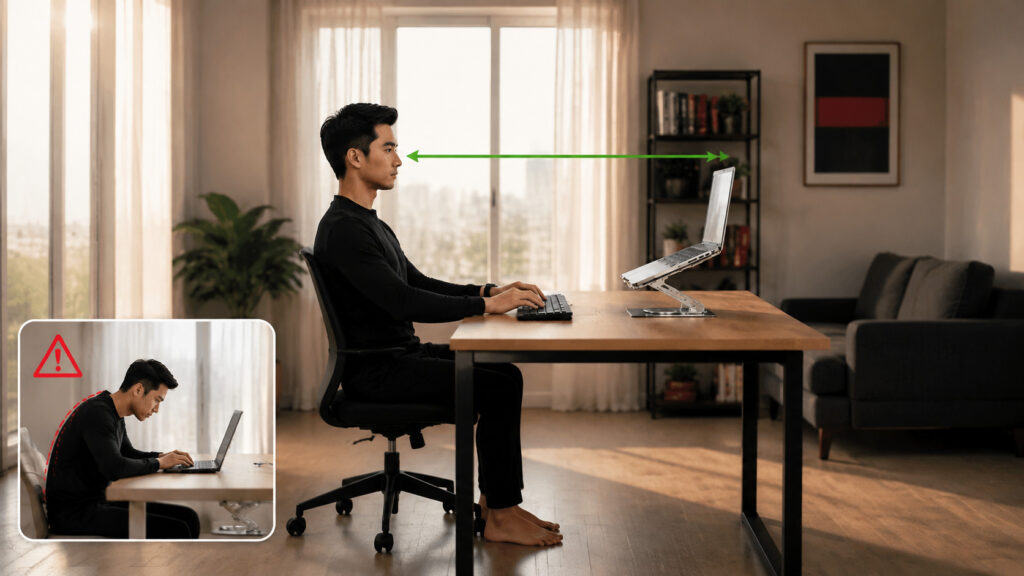
Even the best exercises won’t help if your workstation encourages poor posture all day.
Use this checklist.
Your Monitor
✓ Directly in front of you
✓ Top of screen at eye level
✓ About an arm’s length away
Your Chair
✓ Adjustable height
✓ Lumbar support
✓ Feet flat on the floor
✓ Knees near 90 degrees
Your Keyboard
✓ Close to your body
✓ Elbows around 90 degrees
✓ Wrists neutral
Your Mouse
✓ Within easy reach
✓ Avoid stretching your shoulder forward
Laptop Users
If you work primarily on a laptop:
- Use a laptop stand.
- Connect an external keyboard.
- Use an external mouse.
This simple setup significantly reduces neck strain.
Healthy Daily Habits That Protect Your Neck
Long-term neck health is about more than posture.
Small lifestyle habits also matter.
Sleep Position
A supportive pillow helps maintain your neck’s natural alignment.
Sleeping on your back or side is generally more neck-friendly than sleeping on your stomach, which often forces your neck into a rotated position for hours.
Stay Physically Active
Regular walking, swimming, yoga, or strength training improves circulation, flexibility, and muscle endurance.
The more active your body is, the better it tolerates long periods of desk work.
Reduce Smartphone Time
Many people improve their computer posture but spend hours looking down at their phones.
Try to:
- Hold your phone closer to eye level.
- Avoid scrolling with your head bent forward.
- Take regular breaks from handheld devices.
Manage Stress
Mental stress often causes physical tension.
Simple techniques include:
- Deep breathing
- Meditation
- Mindfulness
- Short walks
- Relaxing music
Reducing stress helps prevent unnecessary tightening of the neck and shoulder muscles.
Common Mistakes That Make Neck Pain Worse
Avoid these habits if you want lasting relief.
Ignoring Early Symptoms.
Minor stiffness is often your body’s first warning sign.
Addressing discomfort early is much easier than treating chronic pain later.
Sitting for Hours Without Moving
No chair can protect your neck if you remain still all day.
Movement is essential.
Stretching Too Aggressively
Stretching should feel comfortable: not painful.
Avoid jerking or forcing your neck beyond its natural range of motion.
Using a Laptop on Your Lap
This almost guarantees poor neck posture.
Raise your screen whenever possible.
Looking Down at Your Phone Constantly
This habit contributes to “tech neck” and places unnecessary strain on the cervical spine.
Depending Only on Pain Medication
Pain relievers may temporarily reduce discomfort, but they don’t address the underlying causes such as poor posture, muscle weakness, or an inadequate workstation.
Long-term improvement comes from correcting these contributing factors.
When Should You See a Doctor?
Most desk-related neck pain improves with ergonomic adjustments, movement, and exercise.
However, seek medical advice if you experience:
- Pain lasting more than 2 - 3 weeks
- Pain that continues to worsen
- Numbness or tingling in your arms or hands
- Weakness in your arms
- Severe headaches associated with neck pain
- Pain following an accident or injury
- Difficulty moving your neck
- Pain that interferes with sleep or daily activities
Prompt evaluation can help identify conditions that require targeted treatment beyond self-care.
Your Daily 5-Minute Neck Relief Routine
Use this routine during your workday:
Minute 1
- Stand up.
- Walk around your workspace.
Minute 2
Perform:
- Chin Tucks × 10
Minute 3
Perform:
- Neck Side Stretch
20 seconds each side
Minute 4
Perform:
- Shoulder Rolls × 10
- Shoulder Blade Squeezes × 10
Minute 5
- Deep breathing
- Reset your posture
- Drink water
- Return to work
Repeating this routine several times throughout the day can make a noticeable difference in how your neck feels by the end of the workday.
Recommended Ergonomic Products
While habits matter most, the right equipment can support better posture.
Consider:
| Product | Benefit |
| Adjustable Ergonomic Chair | Supports the natural curve of the spine |
| Laptop Stand | Raises the screen to eye level |
| External Keyboard | Allows comfortable arm positioning |
| External Mouse | Reduces shoulder and wrist strain |
| Standing Desk | Encourages alternating between sitting and standing |
| Monitor Arm | Makes screen-height adjustment easier |
| Footrest | Supports proper lower-body posture |
| Ergonomic Keyboard | Promotes a more natural wrist position |
Choose products that fit your workspace and needs rather than assuming expensive equipment alone will solve the problem.
Final Thoughts
The most effective neck pain relief strategies don’t rely on a single stretch, expensive chair, or quick fix. They come from combining good ergonomics, regular movement, targeted exercises, and healthy daily habits.
Small adjustments, raising your monitor, taking brief movement breaks, strengthening your postural muscles, and staying mindful of your posture, can significantly reduce neck strain over time.
Think of neck health as an ongoing investment rather than a one-time solution. The habits you build today can help you stay comfortable, productive, and pain-free throughout your career, whether you work from home, in an office, or anywhere in between.
Key Takeaways
- Most desk-related neck pain results from poor posture, prolonged sitting, and inadequate workstation ergonomics.
- A properly positioned monitor, ergonomic chair, and well-placed keyboard reduce unnecessary strain on the neck.
- Regular movement breaks are essential: even the best workstation cannot replace movement.
- Chin tucks, shoulder blade squeezes, and gentle neck stretches improve posture and mobility.
- Strengthening the upper back, shoulders, and core supports long-term neck health.
- Laptop users should consider a stand, external keyboard, and mouse for a more ergonomic setup.
- Stress management and healthy sleep posture contribute to reducing muscle tension and recurring pain.
- Address mild symptoms early to prevent chronic discomfort.
- Seek medical evaluation if pain persists, worsens, or is accompanied by neurological symptoms.
- Consistency with healthy habits is the most effective strategy for lasting neck pain relief.
Disclaimer
This article is intended for educational and informational purposes only and should not be considered medical advice. Mild neck discomfort caused by desk work often improves with ergonomic adjustments, regular movement, and appropriate exercises. However, if you experience severe or persistent neck pain, numbness, tingling, weakness, pain following an injury, or symptoms that interfere with daily activities, consult a qualified healthcare professional for an accurate diagnosis and personalized treatment plan.